Voice-Controlled GoPro Recording with External Audio on Android
Introduction
Recently, I started recording motorcycle videos using my GoPro Hero 12. I ran into an issue: apparently, to record audio with a wired microphone on a GoPro, you need to purchase additional accessories, and to record with a Bluetooth microphone, the camera must remain powered on at all times, since it’s not possible to start recording from standby mode using a wireless microphone.
To solve this problem without spending more money on camera accessories and still be able to record from standby, I decided to use my programming knowledge. In this post, I will detail the process I followed to arrive at a solution.
Proposal
My idea is to record the video audio on the phone and the video directly on the GoPro. To achieve this, I need to recognize a voice command that allows the phone to turn on the GoPro and start recording, while simultaneously beginning to save the audio.
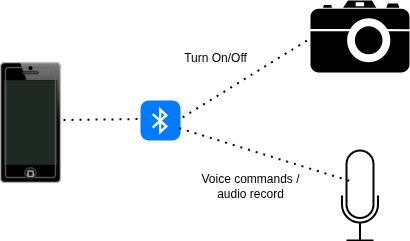
Requerimientos
- Android 14 device
- GoPro Hero 12 camera (it will probably work with almost any version)
- DJI Mic Mini microphone (any wireless microphone might work)
- Android Studio
Development
In this section, I will give a high-level overview and mention only the most important points of the project. The repository link can be found in the attachments section.
I developed the project in Android Studio Narwhal, using Kotlin with SDK 36, since the BLE example provided by GoPro is written in Kotlin. The libraries used were:
implementation(libs.androidx.core.ktx)
implementation("com.juul.kable:core:0.28.0")
implementation ("com.alphacephei:vosk-android:0.3.47@aar")
implementation (project(":models"))
implementation(libs.androidx.appcompat)
implementation("net.java.dev.jna:jna:5.13.0@aar")
implementation(libs.material)
implementation(libs.androidx.activity)
implementation(libs.androidx.constraintlayout)
implementation(libs.androidthings)
testImplementation(libs.junit)
implementation("org.jetbrains.kotlinx:kotlinx-serialization-json:1.4.1")
androidTestImplementation(libs.androidx.junit)
androidTestImplementation(libs.androidx.espresso.core)
implementation("io.ktor:ktor-client-core:2.2.3")
implementation("io.ktor:ktor-client-cio:2.2.3")
implementation("org.jetbrains.kotlinx:kotlinx-datetime:0.4.0")
implementation ("org.jetbrains.kotlin:kotlin-reflect:1.7.20")
implementation("io.coil-kt:coil-compose:2.2.2")
I should highlight the dependency implementation(project(":models")). This corresponds to an internal module of the project that stores the AI model used for voice recognition. For this task, I used Vosk via the com.alphacephei:vosk-androiddependency.
The general idea of the project is shown below:
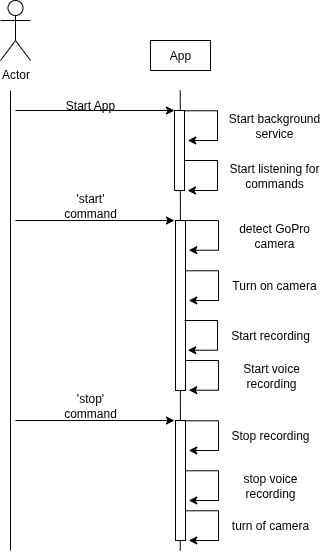
When opening the application, a button is displayed that starts a background service responsible for the entire process. This service initializes Vosk, starts capturing audio, and connects to the GoPro camera. When the phone detects the voice command "start", it begins the sequence to detect the camera, turn it on, and start recording both audio and video. When the "stop" command is detected, the recording process ends, the camera is turned off, and the resulting audio file is saved on the phone. Essentially, it is a fairly simple application.
MainActivity.kt is the entry point of the application. The onStartServiceClick method is triggered when pressing the Start Service button and is responsible for starting or stopping the service.
SyncService.kt is the main service where all the logic takes place. Here, the model is initialized, the connection to the camera is established, and audio recording is managed. To make the code easier to read, I separated the logic into GoProRecorder.kt and MicRecorder.kt, which encapsulate the specific tasks of each component.
When MicRecorder.kt detects a voice command, it calls either startCallback or stopCallback in SyncService.kt, depending on the command, to start or stop the corresponding sequence.
MicRecorder.kt contains all the logic related to the microphone. This class creates three threads:
-
startListeningThread: responsible for reading audio from the microphone and storing it in a shared queue. -
startRecognitionThread: processes the audio to recognize voice commands and execute the callbacks. -
startRecording: starts when recording begins and saves the audio to a file on the phone.
The threads are separated because the voice recognition process is relatively heavy and could introduce latency. This way, one thread is dedicated solely to collecting audio, while the others process it independently.
GoProRecorder.kt encapsulates the logic related to the GoPro camera. At this point, it is also important to mention the Ble.ktfile, which was extracted entirely from GoPro’s BLE example, as it greatly simplifies interaction with the camera. The implemented functions include connecting, disconnecting, starting recording, stopping recording, and camera detection. All these functions are invoked from SyncService.kt.
After this general overview, you should now have a clear idea of how the application works. The code is not ideal, as this is a personal-use project. Additionally, I do not have much experience with Kotlin or mobile development in general.
Conclusions
With this project, a simple Kotlin application was developed that allows simultaneous audio and video recording through voice commands. Additionally, after implementing and testing this solution, I identified a possible alternative approach worth mentioning.
This approach would avoid using AI for voice recognition, since I noticed that due to road noise (wind, engine noise, etc.), the command sometimes needs to be repeated several times before being recognized. The idea would be for the phone to detect when the camera exits standby mode and when it starts or stops recording, in order to automatically start or stop recording audio.
In this way, the voice command recognition problem would be eliminated. However, further investigation would be required to determine whether this approach is truly feasible. During some quick tests performed while developing the project, I got the impression that this solution might not be possible, but those were very preliminary tests and nothing conclusive. If developed, this alternative approach would be included in the same project repository.